
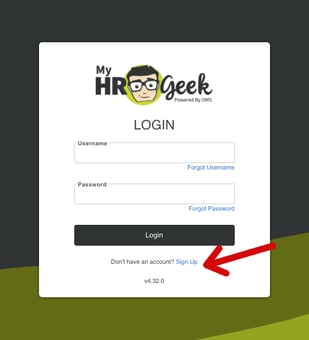
Go to myhrgeek.com and click the blue Sign Up link, and complete the information requested.
If you forget your Username or Password, click the blue Forgot Username or Forgot Password links.
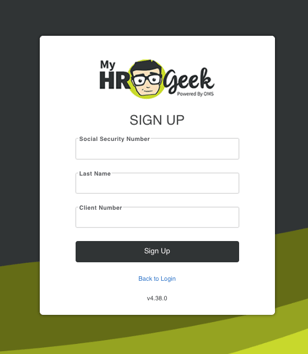
Enter the three fields required to retrieve your account details and link to your payroll. The client number is a unique number assigned to your employer. Ask your employer for their HRGeek client number to set up your account.
Security Questions: When creating your MyHRGeek account, the system will ask you to select three security questions and provide the answers to save, please select three DIFFERENT security questions from the dropdown menus. Using the same question more than once may cause account verification issues. Please review your selections before submission. Every time you attempt to access your account, the system will ask you one of the three questions.
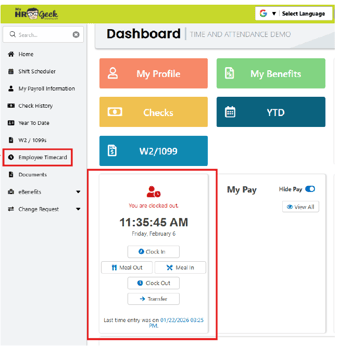
If you have access to the time clock, it will appear on your dashboard. You can review your timesheet and individual punches by clicking Employee Timecard in the main menu on the left side of the page.
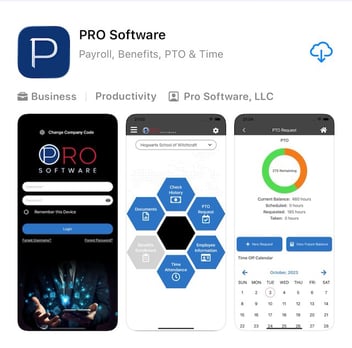
Employee Phone App: We also have an app that can be downloaded from the Apple App Store or Google Play Store. Search for Pro Software. Download the app and enter the company code: myhrgeek. Then you can sign in if you already created your account, or complete the same sign-up steps outlined above in the app.
View Paycheck:
From the MyHRGeek dashboard and the main menu you can access check data, year-to-date info, W-2, the time clock, change requests, and more.
Update Email and/or Mailing Address:
To update your address and email, go to the main menu and select My Payroll Information, then Profile tab. Click Edit on the bottom right corner of the page, make changes, then click Save in the bottom right. corner.
Change Tax Withholding:
If you'd like to change your tax withholding amount, go to My Payroll Information, then the Tax Set Up tab.
Remember to save or record your password in a safe place.
If you don't have access to certain features within the system, your employer may have particular items locked. You can talk to your employer's admin or let us know if you need help.
When you contact us about any issue regarding payroll or benefits, we will always verify your identity before reviewing any details of your account. Because of the nature of our business, we will not be able to talk to anyone other than you.